
Muhammad Dilawar
Founder & CEO
Muhammad Dilawar is a WordPress developer and technical SEO specialist with over 12 years of experience building, optimizing and maintaining websites. He works with WordPress, WooCommerce, server optimization, DNS, SSL, Cloudflare, website security and performance, and is a Top Rated freelancer on Upwork with a 100% recommendation rate.
Articles by Muhammad Dilawar (1166)
How to: Add nRelate Related Posts in Genesis?
nRelate a WordPress plugin which let's you add related posts below post content. Today, we'll show you, how to add nRelate Related Posts in Genesis Framework

Two Ways to Change Database Tables Prefix wp_ in WordPress
Today, we’ll show you how you can change your WordPress database Tables prefix wp_ in your blog to enhance your blog security. Two Ways to Make it Happen!

10 WordPress Database Backup Plugins That Are Still Maintained
10 WordPress backup plugins checked on wordpress.org: UpdraftPlus, WPvivid, BackWPup, Duplicator and more, plus which old backup plugins are now closed.
How to: Add Floating Social Sharing Bar Below Post Title in WordPress?
Guide on adding floating social Sharing buttons to posts in your WordPress blog using floating social sharing bar which is actually a WordPress plugin.

How to Update a WordPress Theme Without Losing Changes
Update a WordPress theme from the Updates screen, the Themes screen or a ZIP upload, turn on auto-updates, and keep your changes safe. Steps for WordPress 7.1.
Free vs Premium WordPress Themes? – Comparing !
How to Choose a Perfect WordPress Theme for your Blog. Let's see the Comparison Between Free vs Premium WordPress Themes?

How to: Add Signup Newsletter Box Below Post Content in Genesis?
Adding Signup Newsletter box in Genesis is quite easy, this tutorials will help you adding Signup Newsletter box below Each Post in Genesis.

How to: Search and Replace Key Phrase in WordPress?
How to Search and Replace Key Phrase in WordPress? The only guide on Correcting the misspell in your WordPress Blog.

Complete Guide on Moving WordPress Core Files into Root Directory
Moving Wordpress Core Files into Root Directory is one of the best way to secure your WordPress blog. Here comes a Complete Guide on Moving WordPress

Top 5 Online Website Speed Analyzers
Top Online Website Speed Analyzers, Gtmetrix, Google Pagespeed Insights, Pingdom, IwebTool, and Ninjas page analyzing tool. Check your website speed today.

Top 3 WordPress Plugins to Improve Image SEO Automatically
Top WordPress Plugins to Improve Image SEO automatically, these includes, SEO friendly Image, Wp Image SEO, and Alt for Images WordPress Plugins

Create Events in WordPress with Quick Event Manager
WordPress make it easy to Create Events using a plugin Quick Event Manager, you don't need to go Facebook or Google to create events

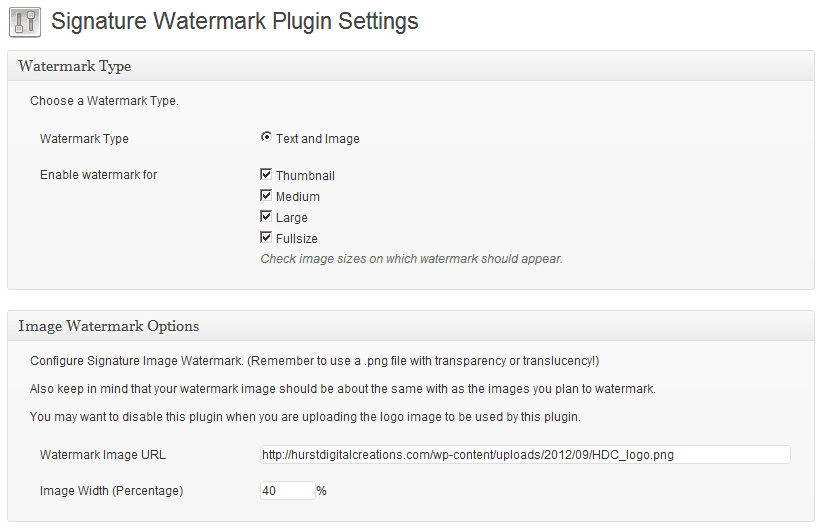
How to add Signature Watermark in WordPress images
How to Add Signature Watermark inside of Images in WordPress blog? You can add a signature watermark within seconds without using graphics softwares.
How to get Google Authorship for Thesis
If you are trying to get Google Authorship for your thesis using website then this article will more guide you on getting google authorship in thesis theme.