WinSCP vs FileZilla: Which Free FTP Client Is Better?
Pick WinSCP if you are on Windows and want the most from a free client: SFTP, SCP, WebDAV and Amazon S3, scripting, a .NET library and PuTTY integration. Pick FileZilla if you need the same app on Windows, macOS and Linux, or you only move files over FTP, FTPS and SFTP.
Both are free and open source under the GNU GPL, both handle the everyday job of uploading a website or pulling logs off a server. The differences are platforms, protocols and automation.
WinSCP vs FileZilla at a glance
| WinSCP | FileZilla | |
|---|---|---|
| Price | Free | Free (FileZilla Pro is a paid subscription, from 12,99 euros for one device) |
| Free plan | The whole program is free | FileZilla Client is free; cloud storage needs FileZilla Pro |
| Platforms | Windows only (Windows 7/2008 and newer) | Windows 8.1 or later, Linux, *BSD, macOS |
| Open source | Yes, GPLv3 or later | Yes, GNU GPL |
| Protocols (free version) | FTP, FTPS, SFTP, SCP, WebDAV, Amazon S3 | FTP, FTPS, SFTP |
| Scripting and automation | Yes: scripting, command line and a .NET assembly | No command line in the free client (FileZilla Pro + CLI is a paid bundle) |
| Best for | Windows users, sysadmins and anyone automating transfers | Mixed Windows, Mac and Linux teams who need plain FTP or SFTP |
Which supports more protocols, WinSCP or FileZilla?
WinSCP supports more protocols in its free version. WinSCP copies files between your computer and remote servers "using FTP, FTPS, SCP, SFTP, WebDAV or S3 file transfer protocols".
The free FileZilla Client supports FTP, FTP over TLS (FTPS) and SFTP, according to its project wiki. Cloud storage such as Amazon S3, Google Drive, OneDrive, Dropbox, Backblaze B2 and Azure, plus WebDAV, is part of FileZilla Pro, the paid edition.
We compared the two on 6 November 2026, reading WinSCP's home page and requirements page and FileZilla's wiki and FileZilla Pro pricing page. If you need to upload to an S3 bucket or a WebDAV server without paying, only WinSCP does it for free. If you need SCP, for an older server that offers SSH but no SFTP, WinSCP is again the one of the two that supports it.
Does WinSCP work on Mac or Linux?
No. WinSCP is a Windows program. Its requirements page says it runs on Windows 7/2008 and newer, up to Windows 11 and Windows Server 2025. There is no macOS or Linux version.
FileZilla is cross-platform. Its wiki says it runs on Windows 8.1 or later, Linux, *BSD, macOS and more. If you switch between a Windows PC and a Mac, or support a team on different systems, FileZilla gives everyone the same interface.
Which is better for automation and scripting?
WinSCP, by a wide margin. It has scripting and a command-line interface, and a .NET assembly you can call from PowerShell or C# to automate uploads, downloads and synchronization. Version 6.7, available for download since 14 October 2026, added synchronization of two local directories and support for the OpenSSH ssh-agent.
The free FileZilla Client is a graphical app. FileZilla Pro sells a "Pro + CLI" bundle, from 24,99 euros, for command-line automation on Windows. If you want to schedule a nightly backup to a server with a free tool, WinSCP is the practical choice.
Which is easier to use?
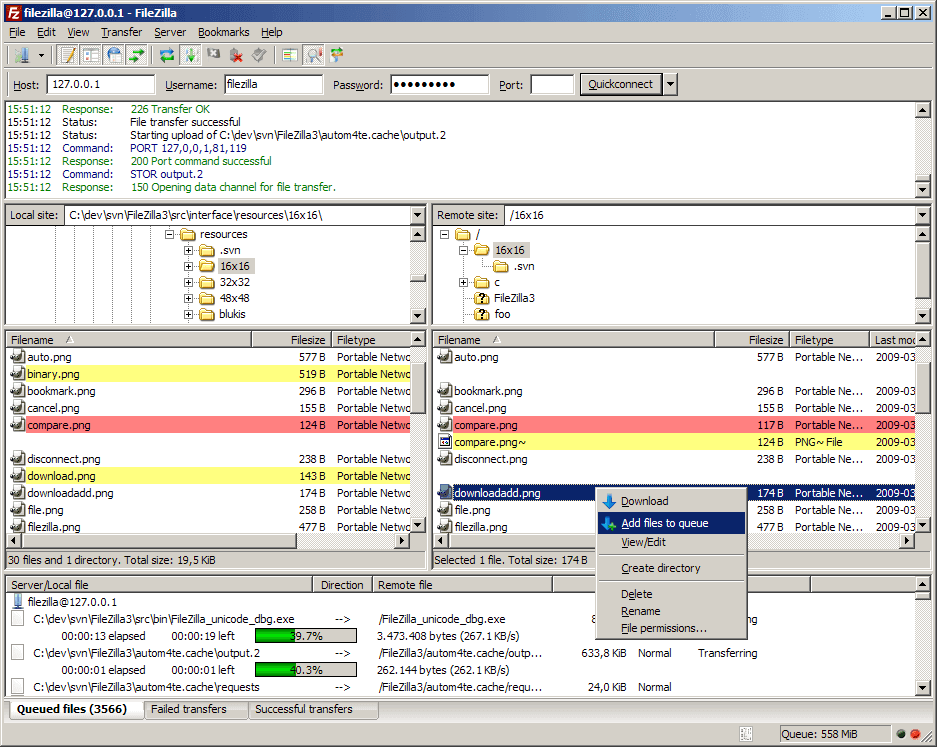
Both are easy for basic transfers: connect, then drag files between your computer and the server. FileZilla's main features include a Site Manager, a transfer queue, bookmarks, drag and drop, speed limits, filename filters, directory comparison, synchronized browsing and remote file search. It also resumes transfers and moves files larger than 4 GB.
WinSCP gives you two interfaces to choose from, called Explorer and Commander. It has an integrated text editor for quick changes to remote files, directory synchronization, an optional master password to protect saved site information, and it shares site settings with PuTTY. It can also run portably, from a configuration file instead of the Windows registry, which suits a USB stick.
Is WinSCP or FileZilla more secure?
Both support encrypted connections: SFTP and FTPS in both, plus SCP in WinSCP. The security of a transfer depends mostly on choosing SFTP or FTPS instead of plain FTP. WinSCP's optional master password protects the site details it stores, which helps on a shared computer. Both programs are open source, so their code can be inspected.
Do you ever have to pay for either one?
Not for WinSCP, and not for the regular FileZilla Client. You only pay if you want FileZilla Pro. Its pricing page lists a single-device plan from 12,99 euros, a Pro + CLI bundle from 24,99 euros, and a plan for up to 3 devices from 29,99 euros. Pro is sold for Windows, macOS and Debian Linux. It is a subscription, and FileZilla warns that a copy kept past its expiry date gets no security updates.
Which should you choose?
- You use Windows and want the most free features: WinSCP.
- You need S3, WebDAV or SCP without paying: WinSCP.
- You want to script or schedule transfers: WinSCP.
- You use macOS or Linux: FileZilla.
- Your team works across different operating systems: FileZilla.
- You need many cloud services in one app and will pay: FileZilla Pro.
For more options, including Cyberduck and MobaXterm, see our WinSCP alternatives.
FAQ
Is WinSCP free for commercial use?
Yes. WinSCP is licensed under the GNU GPL version 3 or later, which lets individuals, schools and companies run it for any purpose for free.
Is FileZilla free for business use?
Yes. FileZilla's FAQ says it is free open source software under the GNU GPL, and that everyone, including companies, can use it for private, educational and commercial work. FileZilla Pro is a separate paid product.
Does FileZilla support SCP?
No. FileZilla Client supports FTP, FTPS and SFTP. For SCP, use WinSCP.
Can WinSCP connect to Amazon S3?
Yes. S3 is one of the protocols WinSCP supports in its free version. In FileZilla, S3 needs FileZilla Pro.
Related Articles
WinSCP vs FileZilla: Which Free FTP Client Is Better?
FileZilla vs Cyberduck: Which Free FTP Client Fits You?
qBittorrent vs Transmission: Which Torrent Client to Use