FileZilla vs Cyberduck: Which Free FTP Client Fits You?
Pick FileZilla if you mainly move files to web servers over FTP, FTPS or SFTP, want a free app that also runs on Linux, and like tools such as directory comparison and a transfer queue. Pick Cyberduck if you are on a Mac or Windows PC and also need cloud storage like Amazon S3, Google Drive, Dropbox or OneDrive in the same app, without paying for an upgrade.
Both are free and open source under the GNU GPL, and both handle the standard server protocols. The real split is cloud storage: Cyberduck includes it for free, while FileZilla puts it in a paid Pro edition.
FileZilla vs Cyberduck at a glance
| FileZilla | Cyberduck | |
|---|---|---|
| Price | Free. FileZilla Pro (cloud storage) from 12,99 € as a subscription | Free, with an optional donation (registration key from 10 USD) or a paid app store version |
| Free plan | The full FileZilla Client is free | The full app is free; a donation prompt appears until you register |
| Platforms | Windows 8.1 or later, Linux, BSD, macOS | macOS and Windows (app); command line version for Mac, Windows and Linux |
| Open source | Yes, GNU GPL | Yes, GNU GPL 3.0 |
| Protocols (free) | FTP, FTPS, SFTP | FTP, FTPS, SFTP, WebDAV, SMB and many cloud services |
| Cloud storage | Only in FileZilla Pro | Included: Amazon S3, Google Drive, Dropbox, OneDrive, Azure, Backblaze B2 and more |
| Best for | Web developers and site owners working with FTP and SFTP servers | Mac and Windows users who mix servers and cloud storage |
Which is cheaper, FileZilla or Cyberduck?
Both cost nothing for normal use. The difference shows up once you need cloud storage.
The FileZilla FAQ says the client is "free open-source software distributed under the terms of the GNU General Public License". If you want cloud services, FileZilla Pro adds them as a subscription. Its pricing page lists a single device license starting at 12,99 €, a version with the command line tool starting at 24,99 €, and a license for up to 3 devices on Windows, macOS and Linux starting at 29,99 €.
Cyberduck is free software with cloud storage built in. It shows a donation prompt after you install or update it. If you donate at least 10 USD, you get a registration key that turns the prompt off and works on more than one of your computers. You can also buy it from the Mac App Store, where it was listed at $23.99 in the US, or from the Windows Store.
Which supports more protocols and cloud storage?
Cyberduck, by a long way, if you are comparing the free versions.
We read both feature lists on 6 November 2026. The free FileZilla Client listed three protocols: FTP, FTP over SSL/TLS (FTPS) and SFTP. Cyberduck's free app listed FTP (with TLS), SFTP, WebDAV, SMB, Amazon S3, Google Cloud Storage, OpenStack Swift, Microsoft Azure, Backblaze B2, OneDrive, SharePoint, Google Drive, Dropbox, Box, Nextcloud, ownCloud and Files.com. To get S3, Google Drive, Dropbox or OneDrive in FileZilla, you need FileZilla Pro.
Cyberduck also lets you open Google Drive and Dropbox without syncing documents to your disk, and supports Cryptomator vaults, which encrypt both file contents and file names before they reach the server.
Which is better for working on a website?
FileZilla has more tools aimed at server work; Cyberduck is lighter and leans on your own editor.
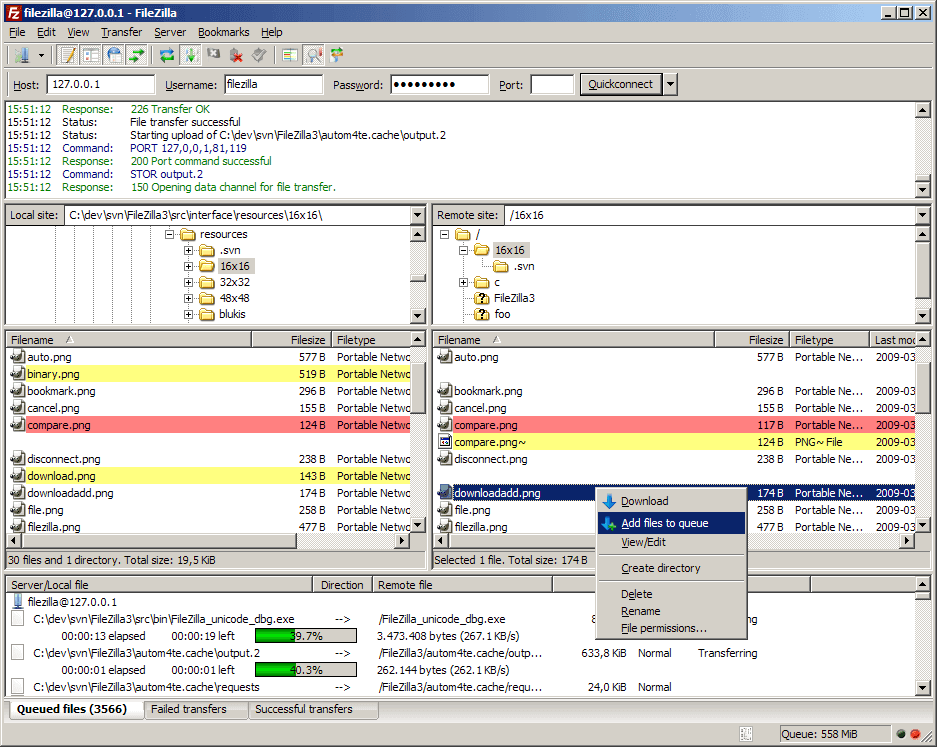
FileZilla's feature list includes:
- A Site Manager and a transfer queue.
- Directory comparison and synchronized directory browsing.
- Remote file search and filename filters.
- Resume support and transfers of files larger than 4 GB.
- Configurable speed limits and HTTP, SOCKS5 and FTP proxy support.
- Editing a remote file in Notepad or any other program, which downloads it to a temporary place and uploads it again when you save.
Cyberduck also edits remote files in any external editor you choose. Its SFTP support includes public key and two-factor authentication and can read settings from your existing OpenSSH configuration. It can copy web and CDN links for files, including pre-signed S3 links, and set up Amazon CloudFront or Akamai distributions.
For a Windows-only option with scripting and S3 in the free version, see our WinSCP vs FileZilla comparison, or browse more WinSCP alternatives.
Does Cyberduck run on Linux, and which runs on older systems?
FileZilla covers more systems. Cyberduck's desktop app is only for macOS and Windows.
- FileZilla: Windows 8.1 or later, Linux, BSD and macOS.
- Cyberduck 9.6.0 (released 5 November 2026): Windows 10 64-bit or later, and macOS 10.13 or later on Intel or Apple Silicon. A command line version, Cyberduck CLI, is available for Mac, Windows and Linux.
If you want remote storage to appear as a drive in Finder or File Explorer, the same company sells Mountain Duck, which has a trial version.
Which should you choose?
- You upload websites over FTP or SFTP: FileZilla.
- You use Linux as your desktop: FileZilla, since Cyberduck has no Linux app.
- You need S3, Google Drive, Dropbox or OneDrive for free: Cyberduck.
- You want client-side encryption on cloud storage: Cyberduck with Cryptomator.
- You already use FileZilla and only need one cloud service: FileZilla Pro, from 12,99 €.
FAQ
Is Cyberduck free?
Yes. Cyberduck is free and open source software. A donation of 10 USD or more gets you a registration key that removes the donation prompt.
Does FileZilla support Amazon S3?
Not in the free client, which supports FTP, FTPS and SFTP. Amazon S3 and other cloud services are part of FileZilla Pro.
Is there a Cyberduck for Linux?
Not as a desktop app. Cyberduck's command line version, Cyberduck CLI, runs on Linux.
Can FileZilla and Cyberduck both use SFTP?
Yes, both support SFTP. Cyberduck's site also lists public key and two-factor authentication for SFTP.
Related Articles
FileZilla vs Cyberduck: Which Free FTP Client Fits You?
WinSCP vs FileZilla: Which Free FTP Client Is Better?
qBittorrent vs Transmission: Which Torrent Client to Use