PostgreSQL vs MySQL: I Benchmarked Both on 1 Million Rows


Pick PostgreSQL if
You are starting a new app and want the faster, lighter default for both everyday writes and reports.
Pick MySQL if
Your software is built for it, like WordPress, or your host only offers MySQL.

I loaded the same 1 million transactions into both, on default settings and identical limits. PostgreSQL won every timed test: 1.4 to 2.9 times faster on writes, 1.2 to 6.2 times faster on reads and reports, and it idled at about a tenth of MySQL's memory. MySQL stored the same table in less space. The raw results and the test script are linked under "How I tested".
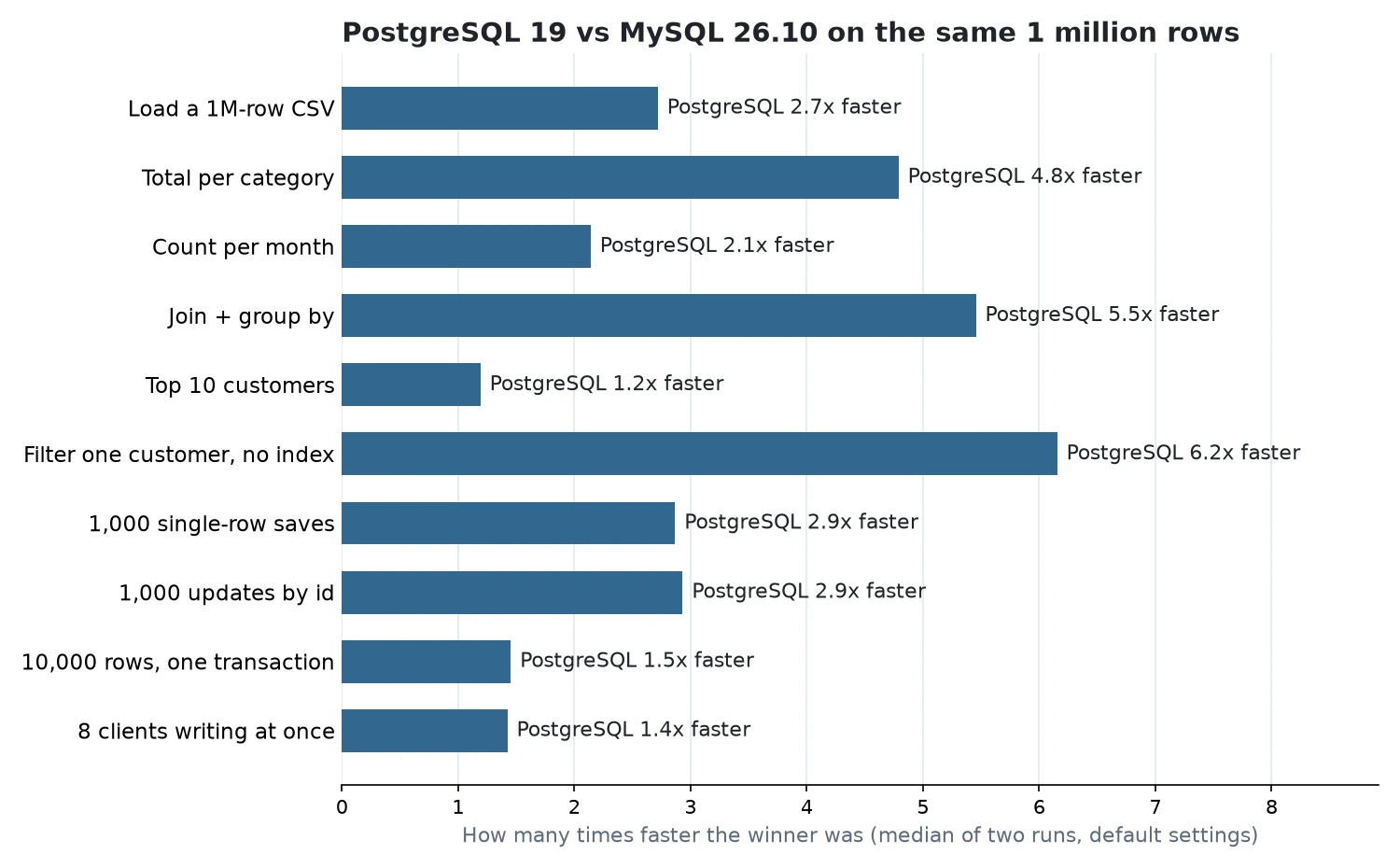
That is a more one-sided result than I expected from two databases as mature as PostgreSQL and MySQL, so most of this page is about how I made it fair, and where it stops applying.
PostgreSQL vs MySQL at a glance
| PostgreSQL 19 | MySQL 26.10 | |
|---|---|---|
| Licence | PostgreSQL License, similar to BSD or MIT | GPL v2 for the Community edition; commercial licence from Oracle if you ship it inside closed-source software |
| Saves to disk on every commit by default | Yes | Yes |
| Docker image size (unpacked) | 170 MB | 299 MB |
| Memory after starting, idle | About 40 MB | About 432 MB |
| My 1 million row table on disk | 89.7 MB | 57.2 MB |
| Best for | New apps, mixed reads and writes, reporting on the same database | WordPress and other software built for MySQL, hosts that only offer MySQL |
Which is faster for everyday app writes?
PostgreSQL, by about three times for single-row work. These are the medians on default settings:
| Task | PostgreSQL | MySQL | Faster |
|---|---|---|---|
| 1,000 inserts, each saved on its own | 1.03 s | 2.94 s | PostgreSQL, 2.9x |
| 1,000 updates by id, each saved on its own | 0.98 s | 2.88 s | PostgreSQL, 2.9x |
| 10,000 inserts in one transaction | 1.60 s | 2.33 s | PostgreSQL, 1.5x |
| 8 clients inserting 4,000 rows at the same time | 2.09 s | 2.97 s | PostgreSQL, 1.4x |
| Fetch one row by id | 0.2 ms | 0.4 ms | Both instant |
The single-row saves matter most here, because that is what a web app does all day: save an order, update a profile, mark a message read. Both databases wait for the disk to confirm each commit by default (PostgreSQL's synchronous_commit is on, and MySQL's manual says its default "is required for full ACID compliance"), so this is like for like. PostgreSQL simply finished each commit faster on the same disk.
The gap narrowed when the work was batched into one transaction, or spread over 8 clients at once. In those tests PostgreSQL was still ahead, by about 1.4 to 1.5 times.
Which is faster for reports and searches?
PostgreSQL again, and by more on queries that read the whole table:
| Query on 1 million rows | PostgreSQL | MySQL | Faster |
|---|---|---|---|
| Join 100,000 customers, total by country and segment | 0.41 s | 2.24 s | PostgreSQL, 5.5x |
| Total spend per category | 0.14 s | 0.66 s | PostgreSQL, 4.8x |
| Count of transactions per month | 0.19 s | 0.41 s | PostgreSQL, 2.1x |
| Top 10 customers by spend | 0.66 s | 0.78 s | PostgreSQL, 1.2x |
| One customer's transactions, no index | 26 ms | 161 ms | PostgreSQL, 6.2x |
| The same, after adding an index | 0.2 ms | 0.3 ms | Both instant |
| Load the 1 million row CSV | 1.85 s | 5.03 s | PostgreSQL, 2.7x |
Both returned exactly the same rows for every query, which I checked after every run. Here is the join typed into each database's own command-line client, with its timer on:
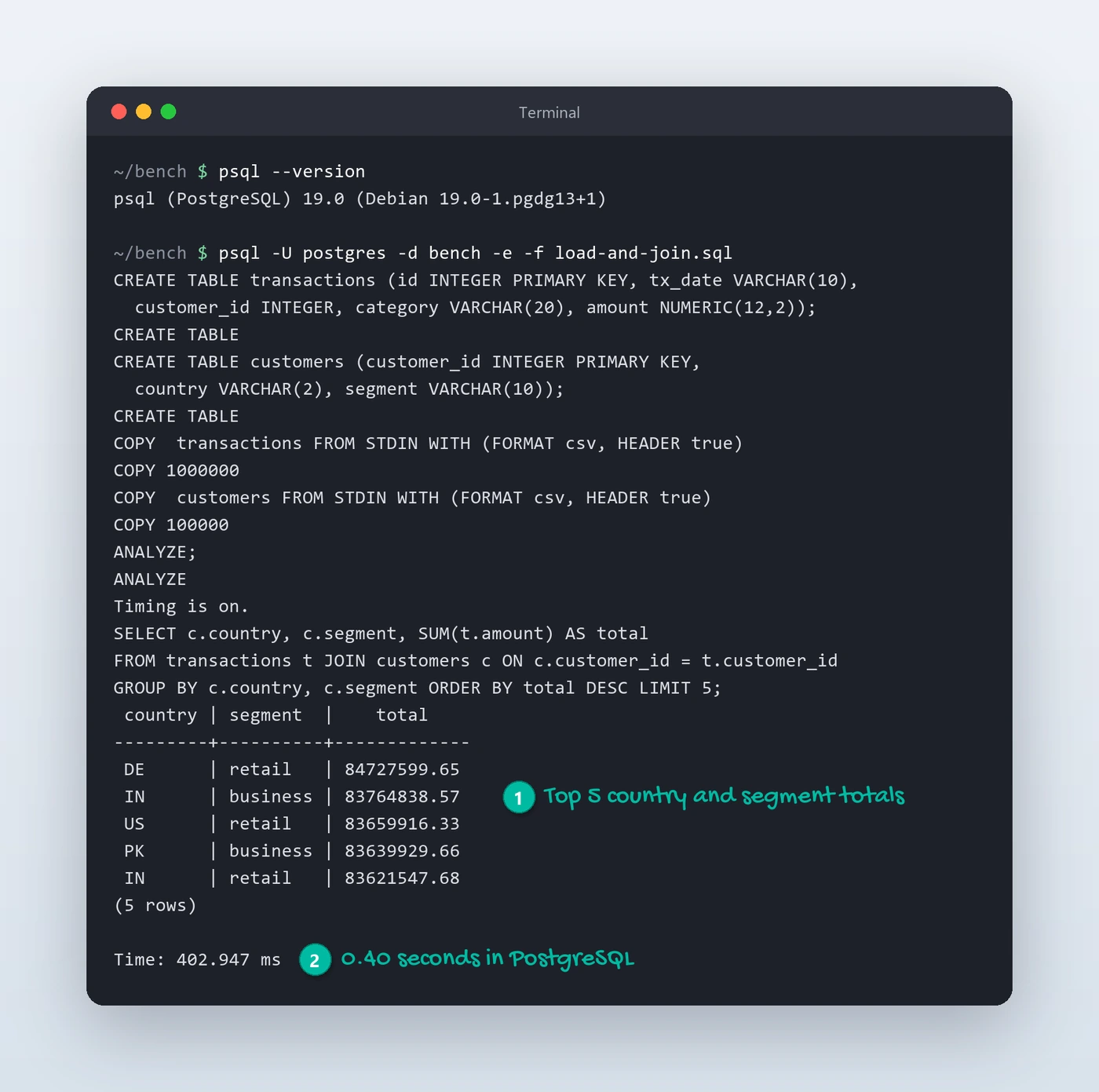
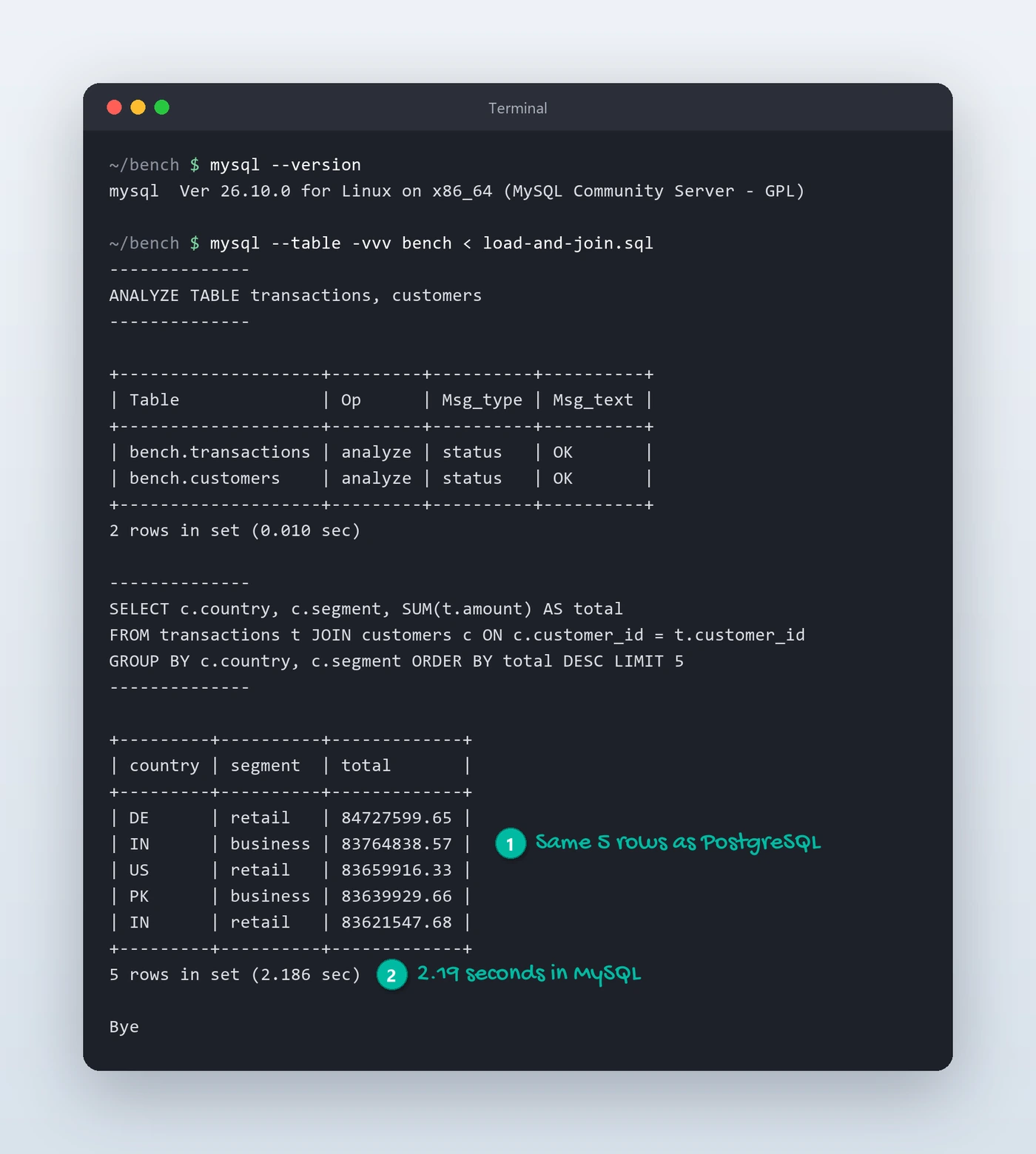
The last row of the table is the one to remember. Without an index, finding one customer's transactions means reading the whole table, and MySQL took six times longer to do it. With an index on the customer column, both answered in a fraction of a millisecond. On either database, the index matters far more than the engine.
Does MySQL catch up if you give it more memory?
Not on this data. MySQL keeps table data in a memory area called the buffer pool, 128 MB by default, and its manual says that on dedicated servers "up to 80% of physical memory is often assigned" to it. PostgreSQL's own guidance suggests 25% of memory for shared_buffers as a starting point.
So I ran everything again with MySQL's buffer pool at 2 GB and PostgreSQL's shared_buffers at 1 GB, half and a quarter of the 4 GB limit. Memory use went up for both, and speed did not improve for either. In that one tuned run, MySQL won two tests: the lookup by id, where both stayed under half a millisecond, and the top 10 customers query, 0.82 s against PostgreSQL's 1.14 s. PostgreSQL had done that query in 0.66 s on default settings, so with a single tuned run I would treat that as noise rather than a real win. Every other test kept PostgreSQL ahead.
The reason is size: my whole MySQL table is 57 MB, so it already fit inside the default 128 MB buffer pool. If your tables are many times bigger than that, the default really is too small, and raising it is the first change to make.
Where MySQL still makes sense
- Software that expects it. WordPress's requirements list MySQL 8.4 or MariaDB 10.11 or newer as the database, and nothing else. If your app or host is built around MySQL, a faster database it cannot use does not help you.
- Smaller tables on disk. The same 1 million rows took 57.2 MB in MySQL and 89.7 MB in PostgreSQL. That is about a third less disk space for the same data.
- A team that already runs it well. A database your team knows how to back up, tune and restore beats a faster one it does not.
How I tested
- Machine: a laptop running each database alone in Docker, limited to 2 CPUs and 4 GB of memory, with its data in a Docker volume. The test client ran in a separate container on the same Docker network.
- Versions: the newest official images at the time of testing, PostgreSQL 19.0 and MySQL 26.10.0, on their default settings unless stated.
- Data: the same 1,000,000 generated transactions and 100,000 customers as my SQLite vs DuckDB test, built from a fixed random seed.
- Loading: each database's own bulk path, COPY for PostgreSQL and LOAD DATA for MySQL.
- Runs: each query 10 times after a warm-up, each write test 3 times, and every test round repeated. PostgreSQL ran twice. MySQL ran four times: twice with the PyMySQL driver and twice with Oracle's own mysql-connector-python driver and its compiled C extension. The numbers on this page are medians, with MySQL's from the official driver. The driver made almost no difference, within about 10% on every test.
- Run to run: PostgreSQL's two rounds stayed within a few percent of each other. One of MySQL's four rounds was slower across the board (the join took 3.5 s instead of 2.1 to 2.3 s). It is in the raw data, and the medians keep it from moving the results.
- What this test doesn't cover: tables bigger than memory, hundreds of connections, replication, other operating systems or disks, and tuning beyond the one memory setting above. It is a fair look at the defaults most people start with, not a ranking for every workload.
- A mistake I fixed: my first MySQL load split the CSV on the wrong line ending and kept a hidden character at the end of each row. The totals still matched, but one query's groups did not, so I fixed the load and ran everything again. Every result on this page comes after that fix.
The raw numbers for every run are in my results CSV, and the test script is here as plain text. Everything needed to rerun it (Docker setup, scripts and the raw results of every run) is in my benchmark repo on GitHub.
Which should you choose?
- A new web app or API with ordinary reads and writes: PostgreSQL.
- Reports and searches on the same database as the app: PostgreSQL, and add indexes for the filters you use most.
- WordPress, or a PHP app built for MySQL: MySQL (or MariaDB), and raise the buffer pool once your data outgrows 128 MB.
- Tight on disk space for a large, simple table: MySQL stored my table in about a third less space.
- You already run one of them well: keep it. The gaps here are real, but smaller than the cost of a migration done badly.
Changes to this page
- Bench v1: first results, PostgreSQL 19.0 and MySQL 26.10.0 on 1 million rows, default and tuned memory settings, two MySQL drivers.
How we compare: prices, plans and features come from each product’s official site, pricing page or app store listing. See how we write.

Related Articles

SQLite vs DuckDB: We Benchmarked Both on 1 Million Rows

Best HeidiSQL Alternatives for mySQL and database management
Adminer MySQL Management Tool for WordPress – PhpMyAdmin on WordPress Dashboard
How to: Change Username and Password in Mysql Databases?
