SQLite vs DuckDB: We Benchmarked Both on 1 Million Rows


Pick SQLite if
Your app needs its own small database for reading and saving individual records.
Pick DuckDB if
You want to analyse data: totals, trends, joins and reports over many rows.

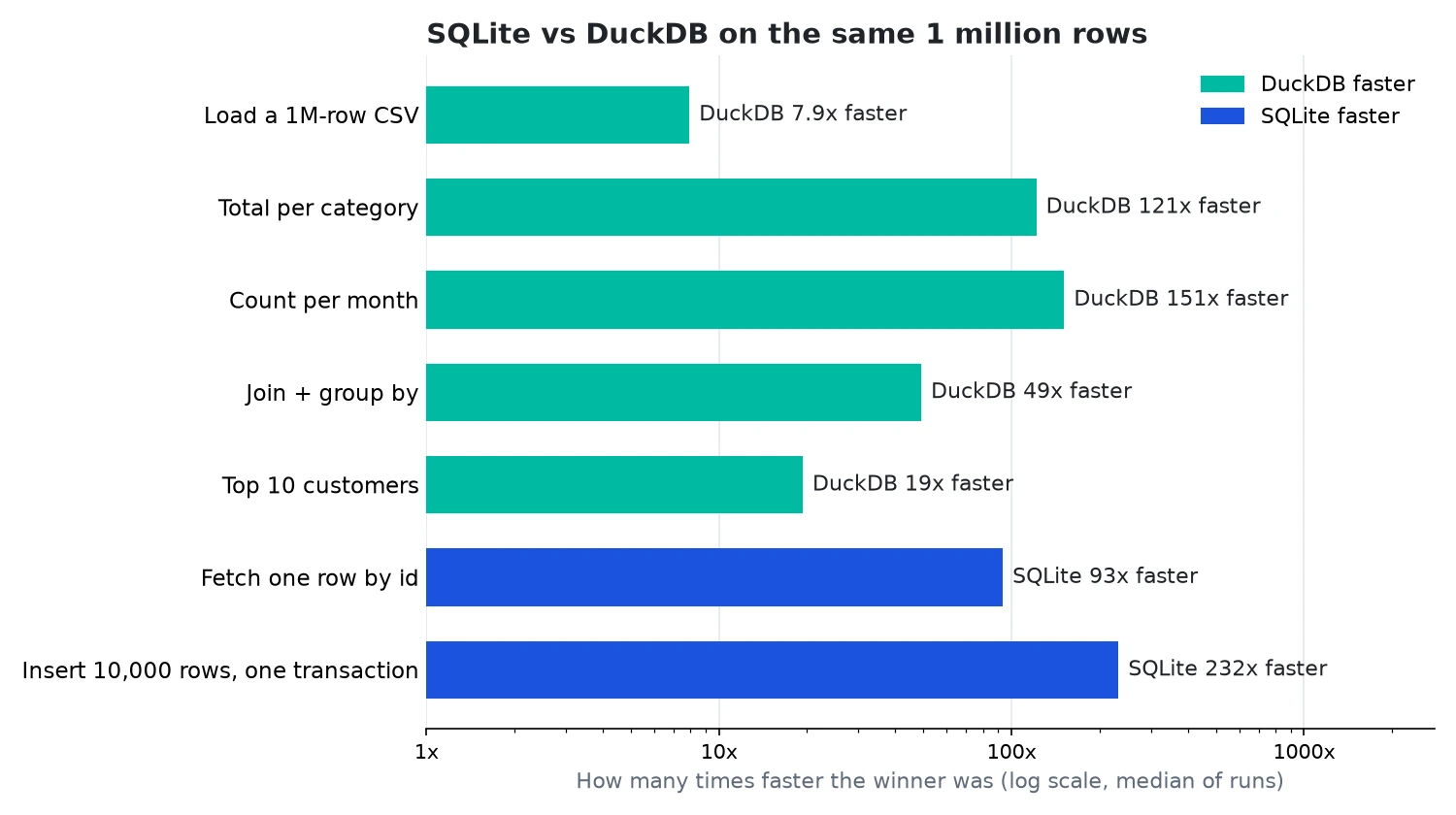
I loaded the same 1 million transactions into both and ran the same queries: DuckDB answered the reporting queries 19 to 151 times faster, and SQLite fetched and inserted single rows 93 to 232 times faster.
SQLite and DuckDB are both in-process databases. There is no server to install or run: the database is a file, and the engine is a library inside your program. That is why people compare them, and why the choice is easy to get wrong. They look alike from the outside and are built for opposite jobs.
SQLite vs DuckDB at a glance
| SQLite | DuckDB | |
|---|---|---|
| Built for | Storing and changing records inside an app | Analytical queries (OLAP) over many rows |
| How it runs | A library in your process, one database file | A library in your process, one database file |
| Price and licence | Free, public domain | Free, MIT licence |
| Writers at once | One writer at a time; in WAL mode readers and the writer do not block each other | One process can read and write; other processes can only open it read-only |
| Reads files directly | CSV through the command-line import | CSV, Parquet and JSON straight from SQL, and SQLite files too |
| My 1M-row test file on disk | 41.6 MB | 8.4 MB |
| Best for | Mobile and desktop apps, small websites, config and cache stores | Reports, notebooks, data pipelines, exploring CSV and Parquet files |
How much faster is DuckDB for analysis?
Very much faster, as soon as a query reads a whole column. On my table of 1 million bank-style transactions, DuckDB won every reporting query by a wide margin. These are medians of 10 runs on the same machine with the same limits:
| Query | SQLite | DuckDB | Faster |
|---|---|---|---|
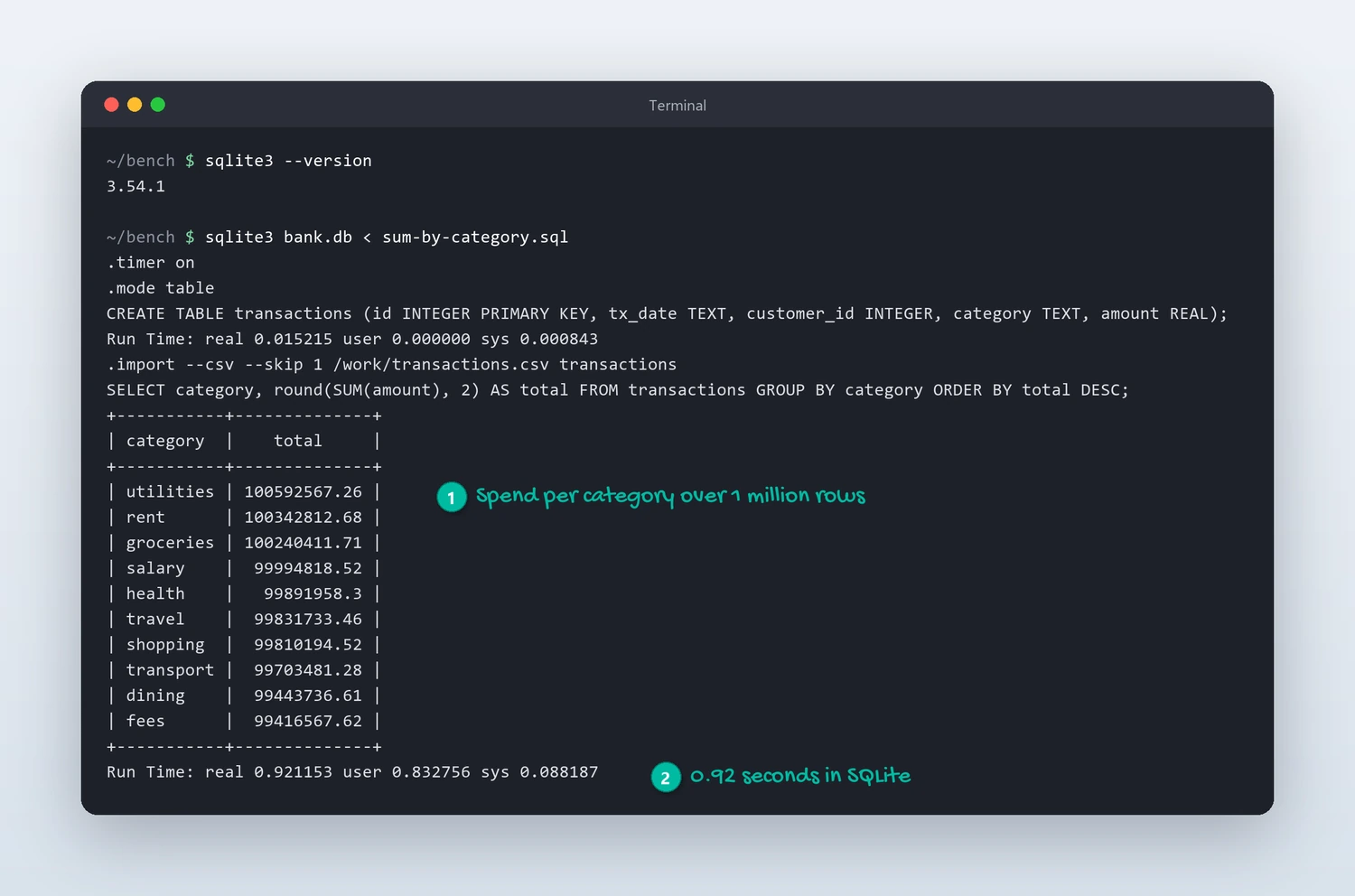
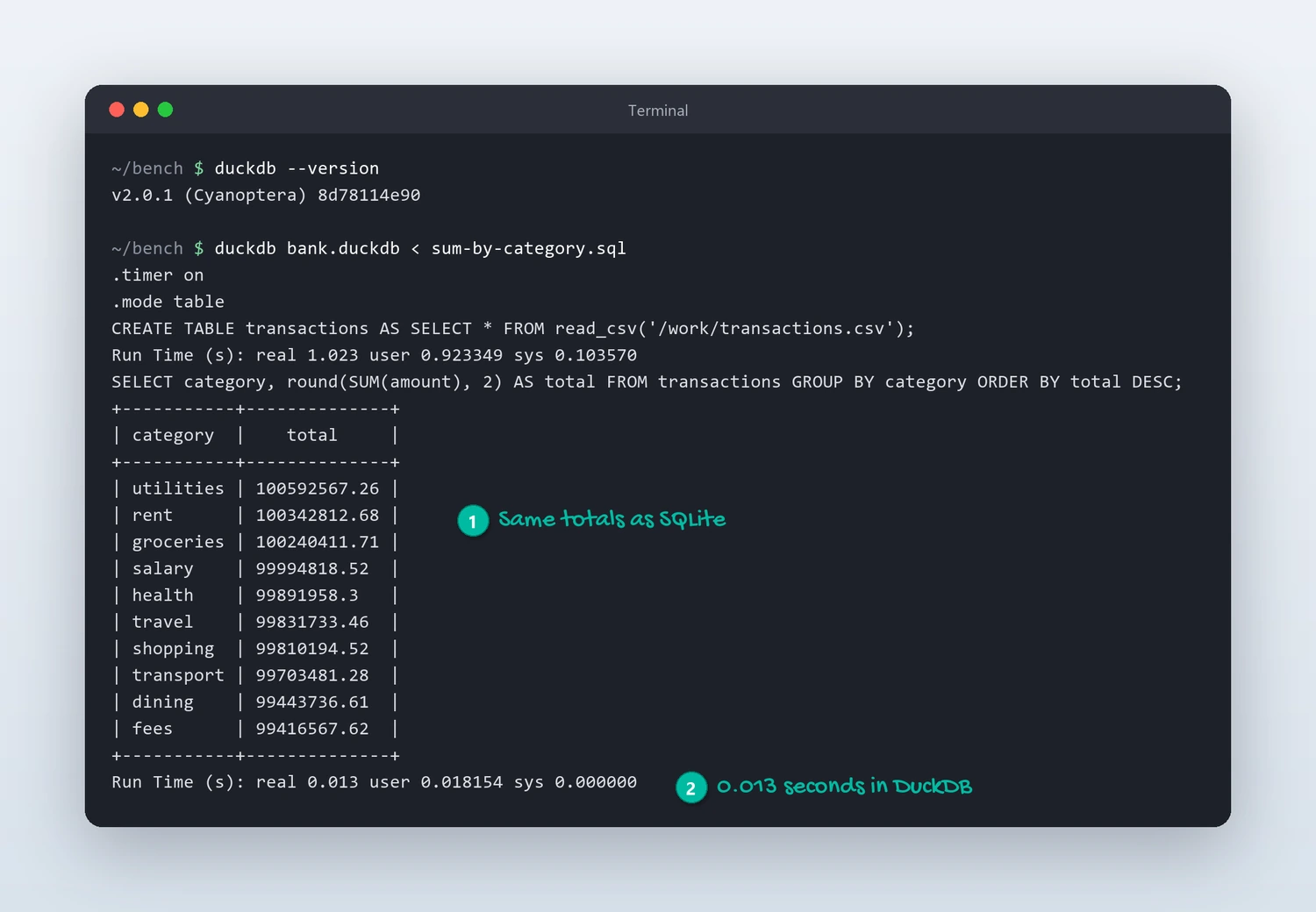
| Total spend per category | 0.51 s | 0.004 s | DuckDB, 121x |
| Count of transactions per month | 0.69 s | 0.005 s | DuckDB, 151x |
| Join 100,000 customers, total by country and segment | 1.57 s | 0.03 s | DuckDB, 49x |
| Top 10 customers by spend | 0.50 s | 0.03 s | DuckDB, 19x |
| Load the 1 million row CSV | 5.48 s | 0.69 s | DuckDB, 7.9x |
Both engines returned exactly the same answers for every query, which I checked row by row. Here is the same "total per category" query typed into each engine's own command-line tool, with the timer switched on:
The reason is in how each engine works through data. DuckDB's own explanation is that it processes a large batch of values in one operation, while traditional systems such as SQLite process each row in turn. A total over one column only needs that column, and DuckDB works through it a large batch at a time. The files differ too: the same data took 8.4 MB in DuckDB and 41.6 MB in SQLite.
A gap of half a second can sound small. It stops being small when a dashboard runs twenty of these queries, or when your table has 50 million rows instead of 1 million.
Where does SQLite beat DuckDB?
Everywhere an app touches one record at a time. That is most of what an app's database does: open a user's profile, save a setting, add an order, mark a message as read.
| Task | SQLite | DuckDB | Faster |
|---|---|---|---|
| Fetch one transaction by its id | 0.009 ms | 0.84 ms | SQLite, 93x |
| Insert 10,000 rows in one transaction | 0.03 s | 7.04 s | SQLite, 232x |
| 1,000 single-row inserts, each saved on its own (SQLite in WAL mode) | 0.02 s | 2.92 s | SQLite, about 130x |
The lookup by id is the clearest case. SQLite goes straight to the row through its primary key. DuckDB is built to scan columns, so even a single-row fetch costs it close to a millisecond. One millisecond is nothing once, but an app page that makes 200 small queries feels it.
The single-row inserts need a note, because the settings matter more than the engine. With SQLite's default settings, 1,000 separate saves took 5.23 seconds, slower than DuckDB's 2.92, because SQLite waits for the disk to confirm every commit. Switching SQLite to WAL mode with synchronous=NORMAL brought the same 1,000 saves down to 0.02 seconds. SQLite's documentation calls that setting the best balance of speed and safety for most apps in WAL mode. The trade-off it describes: after a power cut, the very last transactions may be rolled back, but the database stays consistent. If you use SQLite in an app, those two lines are usually the first thing to set:
PRAGMA journal_mode = WAL;
PRAGMA synchronous = NORMAL;
Can several programs write at the same time?
Not really, in either one, and they limit it differently. SQLite's WAL mode lets readers and a writer work at the same time, but only one writer at a time, across any number of processes. DuckDB's concurrency rules are stricter across processes: one process can read and write, and other processes can only open the file read-only. Inside that one process, DuckDB can run several writing threads.
In practice this means SQLite suits a website or app with many short requests, and DuckDB suits one job (a script, a notebook, a pipeline step) that owns the file while it works. If you need many writers from many machines, neither is the right tool, and a server database such as PostgreSQL is.
Do you have to choose only one?
No, and this is the part most comparisons miss. DuckDB has a SQLite extension that reads and writes SQLite database files directly. So a common setup is to keep your app on SQLite and point DuckDB at the same file when you want reports:
ATTACH 'app.db' AS app (TYPE sqlite);
SELECT category, SUM(amount) FROM app.transactions GROUP BY category;
Your app keeps fast single-row reads and writes, and your analysis gets DuckDB's engine without an export step. DuckDB can also query CSV and Parquet files where they sit, which is why it shows up so often in data notebooks.
How I tested
- Machine: a laptop running both engines in the same Docker container setup, limited to 2 CPUs and 4 GB of memory, with the databases on the container's own disk.
- Versions: the current release of each at the time of testing: SQLite 3.54.1, built from the official source, and DuckDB 2.0.1, both used from Python 3.13.
- Data: 1,000,000 generated transactions (id, date, customer, category, amount) and 100,000 customers, from a fixed random seed so anyone can rebuild the same file.
- Runs: each query 10 times after one warm-up run, loads and writes 3 times. I report the median.
- Fairness: each engine loaded the CSV its usual way (SQLite with batched inserts inside one transaction, DuckDB with
read_csv), and every query result was compared between the two. - What this test doesn't cover: data bigger than memory, many programs writing at the same time, other hardware or operating systems, and any tuning beyond SQLite's WAL setting. Treat it as a guide to which engine fits which job, not a ranking for every workload.
- What I threw away: my first runs kept the database files on a folder shared between Windows and Docker. That folder makes every disk sync slow, and it made SQLite look several times slower than it is, so I moved the files and ran everything again.
The raw numbers are in my results CSV, and the full test script is here as plain text. Different hardware will give different seconds, but the shape of the result (DuckDB for scans, SQLite for single rows) should hold.
Which should you choose?
- A mobile, desktop or small web app that stores its own data: SQLite, in WAL mode.
- Reports, dashboards or one-off analysis over a large table: DuckDB.
- Exploring CSV or Parquet files without loading them into anything first: DuckDB.
- An app on SQLite that now needs reporting: keep SQLite and attach the file from DuckDB for the reports.
- Many users writing at once from different servers: neither; look at a server database such as PostgreSQL.
Changes to this page
- Bench v1: first results, SQLite 3.54.1 and DuckDB 2.0.1 on 1 million rows.
How we compare: prices, plans and features come from each product’s official site, pricing page or app store listing. See how we write.

Related Articles
LivingSocial Was Hacked? Attack Had Affected on More Than 50 Million Customers
Chrome vs Edge: Same Engine, Different Extras

Shopify vs WooCommerce: Real Costs and Who Each Suits