Well, you might don’t feel like you really want to convert .docx file why would you do that while you can write article from post editor huh? Fair enough…
But if you have a multi-authored blog and people are contributing their articles on your site. So, people send you articles via emails in different file formats and one of them is .docx file format. I have experienced this many times by now and recently I got to do this again so I just decided to share this with you guys about how to convert .docx file into WordPress post/page or even on your custom post type.
Convert .docx file into WordPress
First of all, install Mammoth .docx converter WordPress plugin which is mainly designed to convert .docx documents into plain HTML. Mammoth .docx converter helps you to easily convert .docx file into simple and clean HTML by using semantic information in the document, and ignoring other details.
Mammoth converter actually converts any paragraph tag with Heading1 to h1 elements, rather than attempting to exactly copy the styling (font, text size, color, etc.) of the heading. This allows you to paste from Word documents without the usual mess.
NOTE: There may be a large number of mismatches between the structure used by .docx and the structure of HTML so it is obvious that the conversion may unlikely to be perfect for more complicated documents.
Features supported:
- Headings
- Lists
- Tables. The formatting of the table itself, such as borders, is currently ignored, but the formatting of the text is treated the same as in the rest of the document.
- Footnotes and end-notes.
- Images.
- Bold, italics, superscript and subscript.
- Links.
- Text boxes. The contents of the text box are treated as a separate paragraph that appears after the paragraph containing the text box.
How Mammoth .docx converter works?
You will be able to upload the .docx file when adding post/page or custom post type and convert it into plain HTML easily.

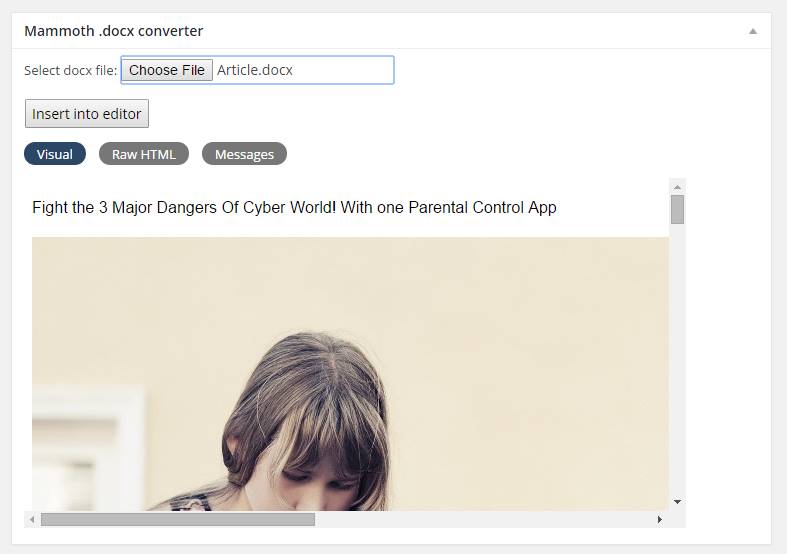
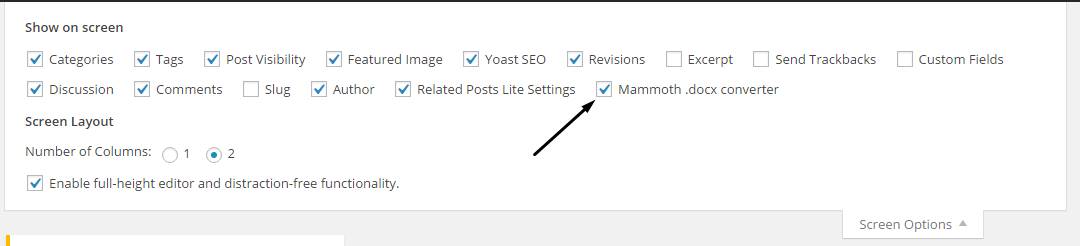
If you can’t see the meta box, make sure that it’s selected by taking a look at the “Screen Options” for adding a post.
Hope everything is clear, if you have any problem while following up this article please comment below.