Alertify.js – Lightweight Customizable Browser Dialogs
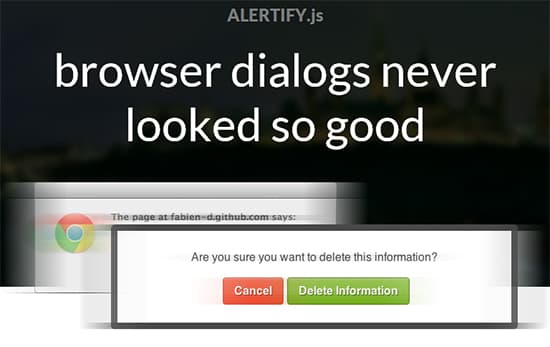
Alertify.js is one of best jQuery plugin to display lightweight customizable dialogs in browser window for your website when implemented. It’s a small library for presenting beautiful dialog windows and notifications. Alertify.js is easy customize via CSS. It has a good API and doesn’t depend on third-party libraries (but plays nicely with them).

To use it, include the css and js files in the section of the webpage where you want to display your lightweight customizable browser dialogs like this:
Include JS
<!-- also works in the <head> -->
<script src="PATH_TO_FILE/alertify.min.js"></script>
Include CSS
<link rel="stylesheet" href="PATH_TO_FILE/alertify.css" />
<link rel="stylesheet" href="PATH_TO_FILE/alertify.default.css" />
Finally, call the methods of the global alertify object:
Alert Dialog
// alert dialog
alertify.alert("Message");
Confirm Dialog
// confirm dialog
alertify.confirm("Message", function (e) {
 if (e) {
 // user clicked "ok"
 } else {
 // user clicked "cancel"
 }
});
Prompt Dialog
// prompt dialog
alertify.prompt("Message", function (e, str) {
 // str is the input text
 if (e) {
 // user clicked "ok"
 } else {
 // user clicked "cancel"
 }
}, "Default Value");

Related Articles
Alertify.js – Lightweight Customizable Browser Dialogs
Jul 19, 2013·Web Design
Lightweight jQuery P
Lightweight jQuery Plugin to Make Full-Screen Scrolling Cool – Windows
May 13, 2013·Web Design

How to Create Call-To-Action Notification Bars with jQuery jBar
Jan 3, 2014·AI Tools and Services
Buttons — A CSS Butt
Buttons — A CSS Buttons Library Built with Sass & Compass
Jun 22, 2013·Web Design
SmartMenus – jQuery
SmartMenus – jQuery Plugin to Make Responsive Website Menus
Jun 4, 2013·Web Design
Pop Easy jQuery Plug
Pop Easy jQuery Plugin to Create Modal Windows Easily
Jun 1, 2013·Web Design