Bun vs Node.js: I Benchmarked Startup, Installs and HTTP


Pick Bun if
You want fast startup, fast installs and TypeScript without a build step in one tool for a new project.
Bun alternativesPick Node.js if
You want a long-term-support runtime that your existing code, libraries and hosting already run on.

I ran both on the same container limits. Bun was faster in every test: about 9 times faster to start a TypeScript file, 35 times faster to reinstall packages from cache, 1.8 times faster on a CPU-heavy script, and 1.4 to 2.6 times faster as a web server. The raw results and scripts are linked under "How I tested".
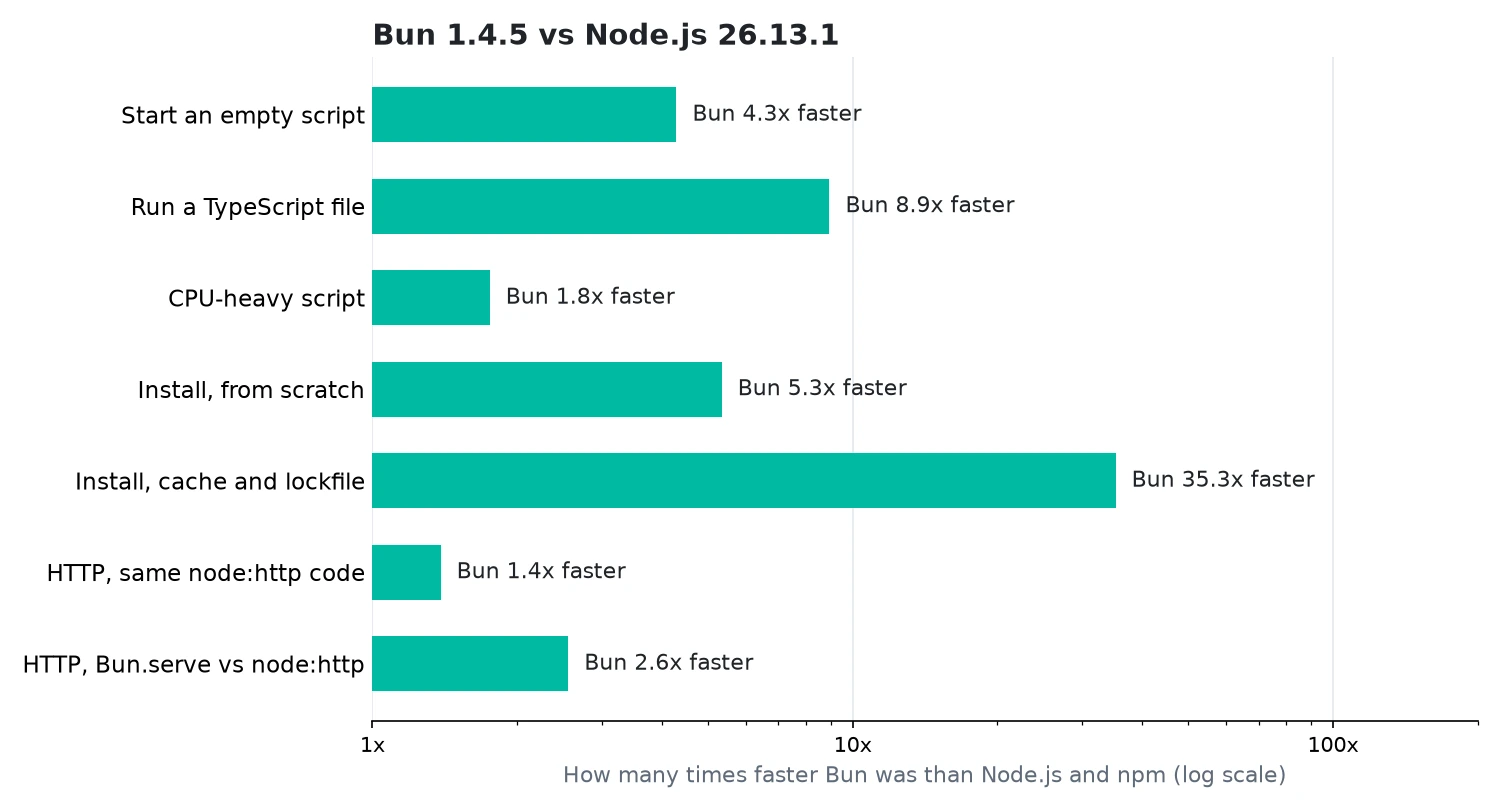
The spread in that chart is the real story about Bun and Node.js. "Bun is faster" is true, but whether it is 1.4 times or 35 times faster depends on which part of your workflow you care about.
Bun vs Node.js at a glance
| Bun 1.4.5 | Node.js 26.13.1 | |
|---|---|---|
| What it is | "an all-in-one toolkit for JavaScript and TypeScript apps", with a runtime "designed as a drop-in replacement for Node.js" | The JavaScript runtime most Node projects are built on; this is an LTS (long-term support) release |
| Package manager | Built in (bun install) | npm, bundled (11.20.0 in this release) |
| Runs TypeScript files | Yes | Yes, by stripping the types, with no type checking |
| HTTP server | Runs node:http, plus its own Bun.serve | node:http |
How much faster does Bun start?
A lot. Starting an empty script took 59 ms on Node and 14 ms on Bun, about 4 times faster. Running a small TypeScript file took 107 ms on Node and 12 ms on Bun, about 9 times faster. These are averages of 30 runs each, measured with hyperfine:
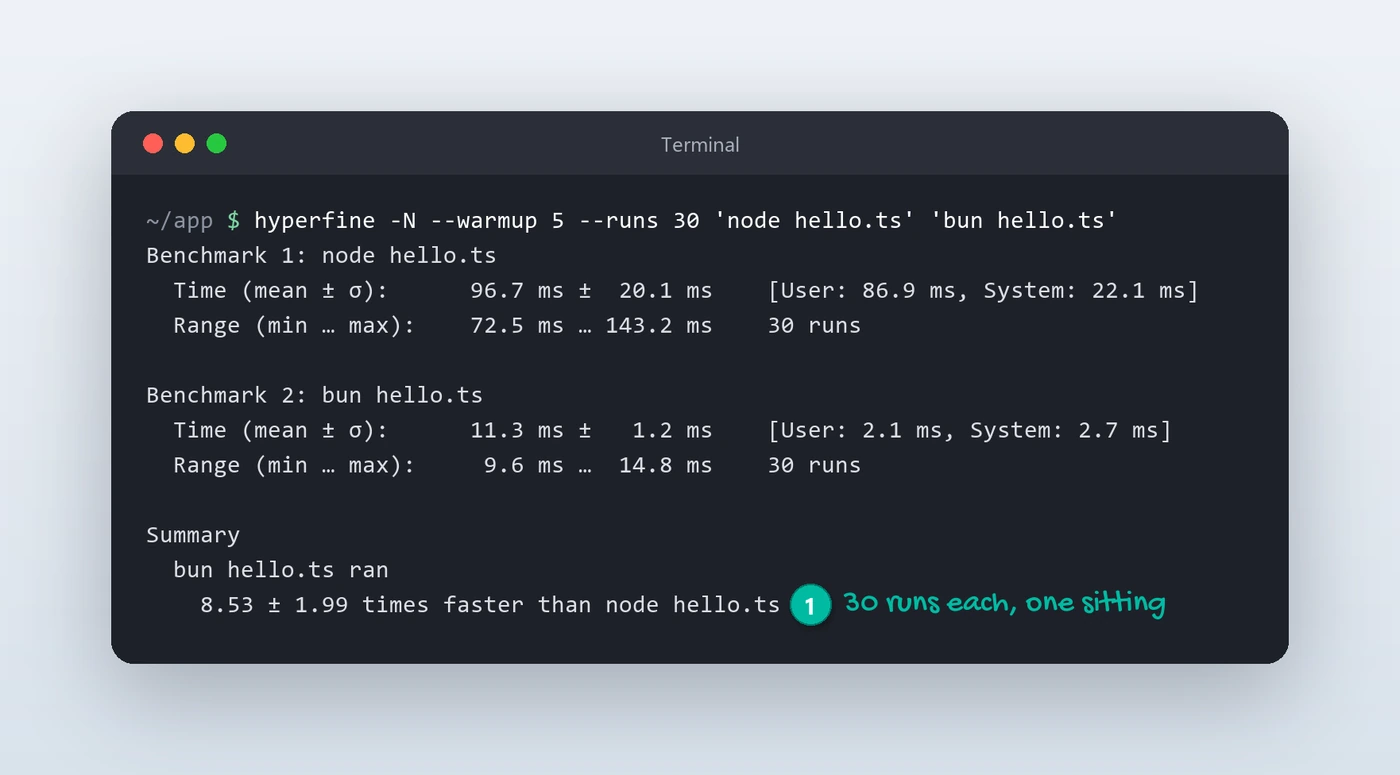
It helps to know what Node is doing here. Node can now run a .ts file directly, which many comparisons still say it can't. Its docs explain how: "By default Node.js will execute TypeScript files that contains only erasable TypeScript syntax. Node.js will replace TypeScript syntax with whitespace, and no type checking is performed." So it works, and the docs mark it as stable, but Node strips the types every time it starts, and Bun gets a TypeScript file running much sooner.
Startup speed matters most for command-line tools, scripts and serverless functions, which start often and run briefly. For a web server that starts once and runs for weeks, a 50 ms difference never shows up.
Is bun install really faster than npm?
Yes, by more than anything else I measured. Same 12 packages, which pulled in the same 197 dependencies at the same versions with both tools:
| Install | npm 11.20.0 | bun 1.4.5 | Faster |
|---|---|---|---|
| From scratch (no cache, no lockfile) | 58.3 s | 10.9 s | Bun, 5.3x |
| Cache and lockfile in place | 3.88 s | 0.11 s | Bun, 35x |
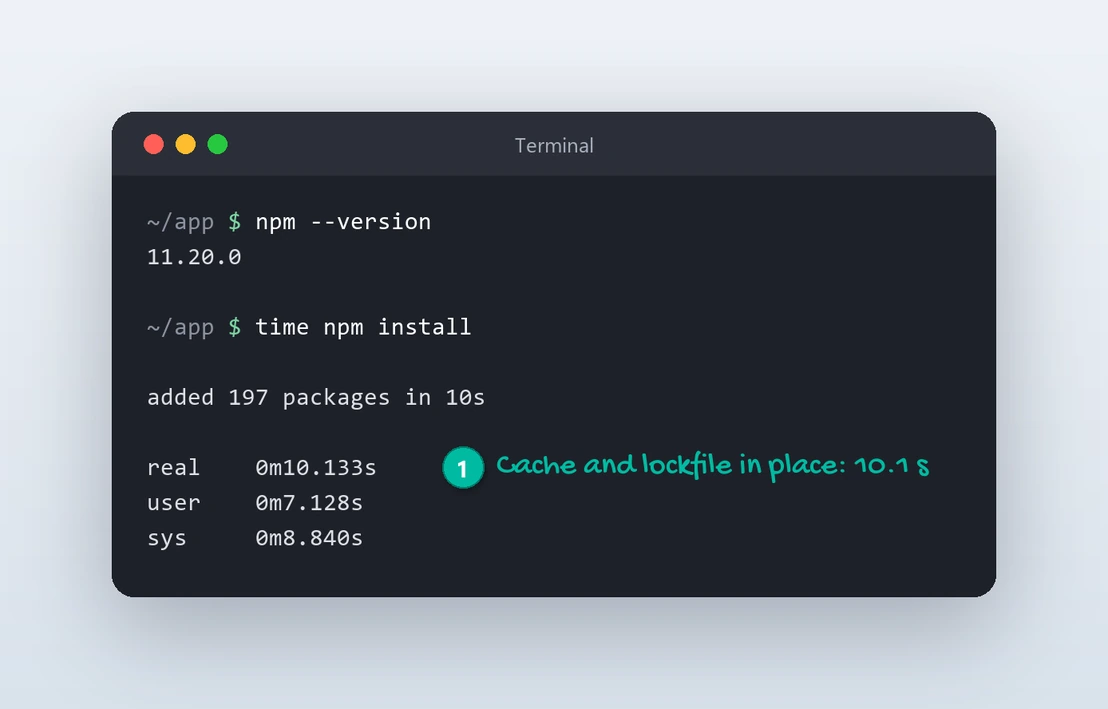
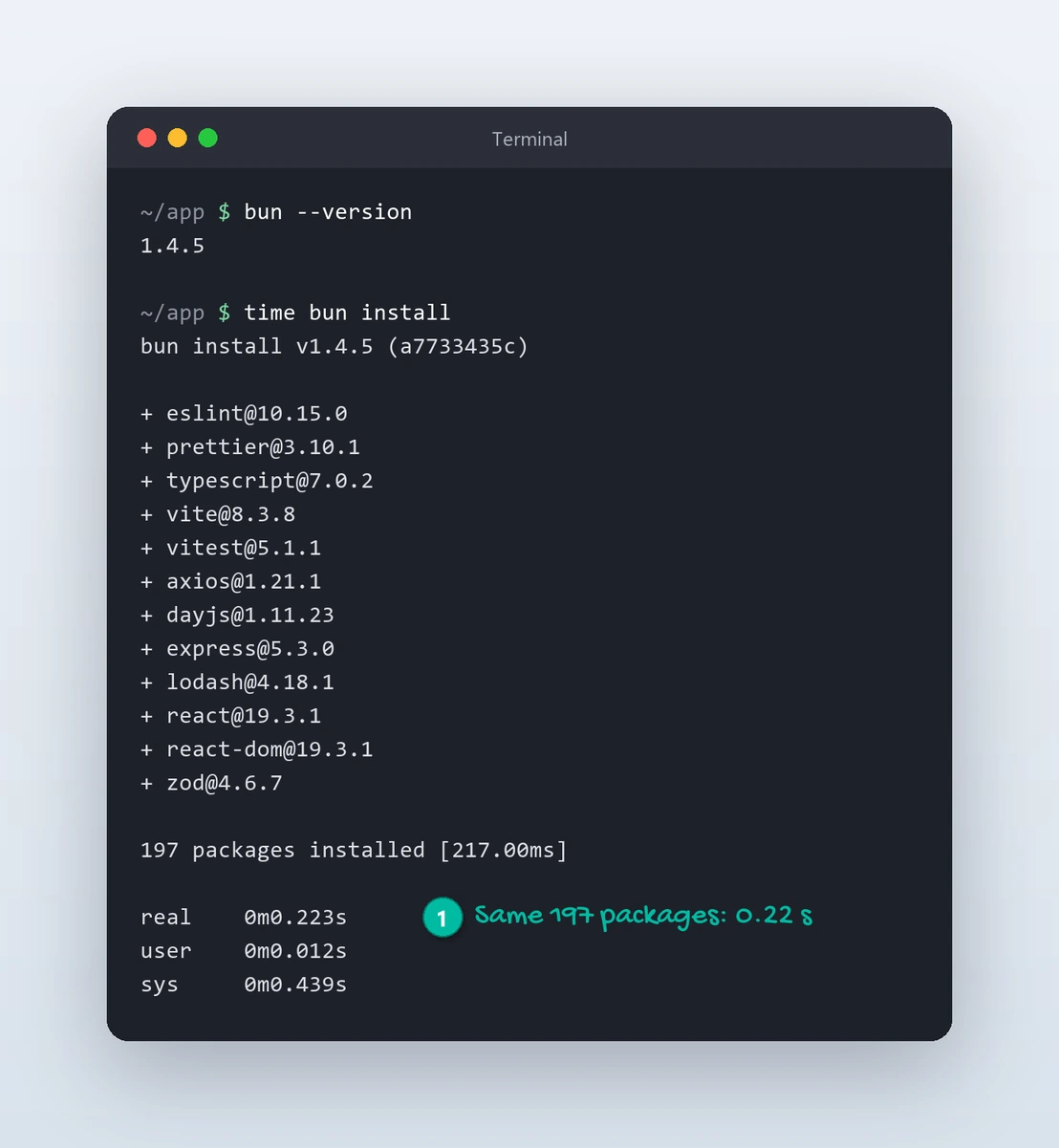
Bun's docs advertise "25x faster" than npm. I measured 5.3 times from scratch and 35 times with a warm cache, so their figure sits between the two.
The cached case is the one you hit all day: switching branches, rebuilding a Docker image, running CI with a warm cache. Both tools produced a node_modules folder of the same 128 MB.
Is Bun faster at real work, not just starting up?
Yes, but by less. I wrote one script that builds 300,000 records, turns them into JSON and back, sorts them and adds them up, then prints a checksum. Both runtimes printed the same checksum. Over 30 runs, Node took 580 ms on average and Bun 330 ms, about 1.8 times faster.
My first attempt used only 10 runs, and the results jumped around so much that I did not trust them, so I ran it again with 30. That is the number above.
How fast is Bun as a web server?
This is where you need to read the fine print. I tested three servers that all return the same small JSON reply, each running alone on 1 CPU, with the load generator (wrk, 64 connections) in a separate container:
| Server | Requests per second (median of 3) | Median response time |
|---|---|---|
Node.js, node:http | 14,947 | 4.2 ms |
Bun, the same node:http code | 20,731 | 2.7 ms |
Bun, its own Bun.serve | 38,229 | 1.5 ms |
Moving your existing Node server to Bun without changing it gave about 1.4 times more requests. The headline 2.6 times needs Bun's own server API, which means rewriting that part of your app, and your code no longer runs on Node. Also remember that this server does nothing. A real app spends most of its time in the database and your own code, so the gap in production will be smaller.
How I tested
- Setup: one Docker image with Node.js 26.13.1 (npm 11.20.0, as bundled) and Bun 1.4.5, limited to 2 CPUs and 4 GB for the startup, CPU and install tests.
- Startup and CPU: hyperfine, 30 runs each after warm-up runs, no shell in between. Averages.
- Installs: express, react, react-dom, zod, lodash, axios, dayjs, typescript, vite, eslint, prettier and vitest, pinned to exact versions. 3 rounds from scratch and 5 with cache, the tool that goes first swapped every round. Medians. Both installed the same top-level versions and 202 package folders.
- HTTP: each server alone on 1 CPU and 1 GB, wrk on another CPU in its own container, a 5-second warm-up, then three 15-second runs. Every response was 200 with the same body.
- What this test doesn't cover: long-running memory use, real apps with a database, Node and npm settings beyond the defaults, other package managers such as pnpm, and whether a given library works on Bun.
- What went wrong first: my first image was missing a library Node needs, so Node would not start at all. I added it and ran everything again.
The raw numbers are in my results CSV, and the test script is here as plain text. Everything needed to rerun it is in my benchmark repo on GitHub.
Which should you choose?
- A new tool, script or serverless function in TypeScript: Bun. Startup and installs are where it is far ahead.
- Faster installs in an existing Node project: Bun's docs say
bun install"works in existing Node.js projects", so you can use it as the package manager and keep running on Node. - An existing Node server in production: stay on Node unless you have tested your libraries on Bun. Expect about 1.4 times more requests from switching alone, and less once a database is involved.
- Long-term support and the most conservative choice: Node.js LTS.
Changes to this page
- Bench v1: first results, Bun 1.4.5 and Node.js 26.13.1 with npm 11.20.0.
How we compare: prices, plans and features come from each product’s official site, pricing page or app store listing. See how we write.
See the alternatives

Related Articles

PostgreSQL vs MySQL: I Benchmarked Both on 1 Million Rows

SQLite vs DuckDB: We Benchmarked Both on 1 Million Rows

Best Bun Alternatives for javaScript runtime and toolkit

Best Autoruns Alternatives for windows startup program management
How to: Enable HTTP Keep-Alive in WordPress?